Showing posts with label jolicloud. Show all posts

Friday, November 19, 2010

Now you can buy the new JoliBook (by @Jolicloud) for £279.99 ! direct link=>


The Jolicloud web site has a new design and new pages and you can follow a direct link to buy the new JoliBook the netbok built by/for Jolicloud !

And, confirmed battery is a 7 hours !

The direct linkto buy it at £279.99 is this one: http://shop.vyepc.com/index.php/cart/
but the only country where you can get it for the moment is the United Kingdom.

Friday, November 12, 2010

wow, JoliBook has an exclusive blue Jolicloud Key like Apple or MS !


We just found the new exclusive bleu Jolicloud key on the keyboard to replace the MS or the Apple ones. This key will probably launch the Jolicloud Menu even if you are in an app.

New Jolibook (Jolicloud netbook) pics, links and vid

As you remember we were the first to "envisage" the real existence of the JoliBook, a netbook for the Jolicloud OS.

Here you can see the first official pics of the machine.


Jolicloud will be produced by the Chinese VYE.

We had for a few hours the official link to the Jolicloud netbook on the VYE website: http://www.vyepc.com/jolicloud.html

But since then it has been put on hold ;-)

The data we could read were:

no price tag already…

screen: 10.1′
processor; dual core intel Atom N550
storage (hard drive): 250GB
memory (RAM) 1GB DD3
battery life: up 3 hours
OS: Jolicloud 1.1


Here the link to the VIDEO from TechCrunch showing the BOX and more details from Tariq Krim himself : http://eu.techcrunch.com/2010/11/11/exclusive-joliclouds-netbook-will-launch-first-in-the-uk-video/

Monday, October 25, 2010

scoop: is Jolicloud preparing a Jolicloud Netbook ? check this pics!


Hi,

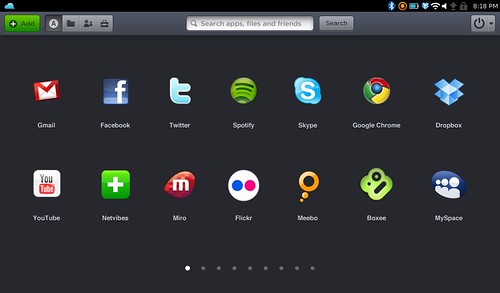
while we wait for the 1.1 version of Jolicloud, Tariq Krim, founder and CEO of Jolicloud has just posted some pictures on Twitter/Facebook and they look nice the new design for the new HTML5 version...

But looking more in detail, I think we got something...


Looking better, it is like it is not just a sticker with the new design on it but I can see a real JOLICLOUD netbook ?

Is that possible that Jolicloud has prepeared in secret a "Jolicloud Netbook" ?
A Jolicloud netbook that would be Joliclouded from the factory ?

Sooo Coool!!

WOW that would something special!

Am I dreaming ? Any news anybody there ? Let me know !!


PS: IF REAL, I WANT ONE, THE BLUE !! ;-)

Thursday, December 10, 2009

If you are an alpha tester of JOLICLOUD just wait to upgrade to Beta


As Tariq Krim has just preesented at LeWeb conference in Paris the new Beta of Jolicloud, let's remind to all of us , alpha testers that the pre-beta version will be available from update in our JOLICLOUD by the end of thsi week. (VIDEO here)

Here is a good post by Robin Wauters from Paris (an early adopter of Jolicloud, like me ;-) and also a journo at techCrunch) on the upcoming beta version of Jolicloud

Friday, December 4, 2009

Jolicloud Not Final Pre-Beta Release Hands On is out !


Update: NETBOOKED a very well informad blog about ... netbooks, created by Peter Cartwright, has just released the First Hand Out review of the to come Jolicloud pre-Beta BUT NOT FINAL release

UPDATE: the version used by Peter is a test version, improving on alpha 2C that we have all, but it is not the new FINAL VERSION of the coming beta!

source: a Tweet from @jolicloud:
@JacopoGio Be aware the Pre-Beta Netbooked got is NOT the final version ;)
jolicloud 5th Dec, 0:23

Many of the points I was asking for an improvement seem to have been corrected (as always with a Tariq Krim project):
- resizing,
- double icon in the task bar ...

Well, we all need to just way another few days to be able to test it on our own ;-)

Wednesday, November 18, 2009

Jolicloud’s Pre-Beta release will support native resolution for Intel Atom z500-series netbooks with the GMA500 chipset.


Adam McDaniel, who joined Jolicloud in January 2009 as lead OS architect, announced in the new Jolicloud's Developers Blog that "Jolicloud’s Pre-Beta release will support native resolution for Intel Atom z500-series netbooks with the GMA500 chipset."

This includes the Asus Eee PC T91MT, Eee PC 1101HA, Eee PC 1201HA, Acer Aspire One 751, Dell Inspiron Mini 10, and Sony Vaio P, among others.

The role of Adam McDaniel is to provide Jolicloud with support for as many netbook architectures as possible, and to fix the other little quirks that other Linux distributions have not yet solved.

Monday, November 16, 2009

Tariq Krim explaining his Jolicloud OS for netbooks

There is a brand new video interview of Tariq Krim explaining and presenting Jolicloud, the easysimple Os for netbooks.

The new UI will be offered in January 2010, and users will be able to control all their UI.

Friday, October 30, 2009

Jolicloud will unveil its real new UI in December !


European Web entrepreneur, Tariq Krim (CEO and founder) has announced that the new User Interface (UI) of Jolicloud, the easysimple Os for Netbooks, will be presented at the LeWeb conference the 9th and 10th of December in Paris.

@tariqkrim => "Can wait to unveil Jolicloud new killer UI at LeWeb. Already the best os perf on netbooks, be ready for phase 2! you aint seen nothing yet"

The UI was the main subject concerning Jolicloud as, at the moment, they it is using the Ubuntu Remix interface.

Friday, October 23, 2009

I have some Jolicloud invites for you ;-)

If you want to try Jolicloud, easysimple OS for Netbooks, just send me your email.

Thursday, October 1, 2009

Google Wave works ok on Jolicloud Os but screen is small


I just received my own Google Wave invite. So here is a capture of my waving on my Dell Mini 9 with Jolicloud , the Os for netbooks with Chrome Dev as browser (was not working on FF).

Gwave is quite "rigid" as it is in beta... everybody is looking for something: gadgets, extensions, edit, delete...

It is difficult to exploit it at the moment. Some say : "it is like IRC of 1998"...

My own thought, now: the screen is too small as the resize is offered by Gwave.

Saturday, September 19, 2009

New "Clouds" screen-saver for Jolicloud


With the latest updates of Jolicloud, the easysimple OS for netbooks, here is the new "Clouds" screen-saver for your netbook.

I love it !

Monday, September 14, 2009

I have one request concerning new FF on Jolicloud


I just launched the new FireFox 3.5 made specially for Jolicloud, the netbbok OS.

All is fine except, a new Tab navigation toolbar line in the FF menu bar, that takes all the second line of the menu.

I would prefer to hide that line(as it was with the previous 3.0 version, but I did not found the right check box in the View>Toolbars menu of FF.

Can someone check this ? Thanks in advance ;-)

So, FireFox 3.5 is arrived on Jolicloud OS !

Yes, the Jolicloud team has managed in just a few weeks to adapt FireFox 3.5 (html5 and canvas) to the Linux based Jolicloud OS for netbooks. Kudos !

Sunday, September 13, 2009

New MiniWidget for Jolicloud (Weather, Localization) is amazing


The new updates of Joliclouds are improuving even more the easysimple netbook OS, still in its alpha version.

Today, I jujst discovered a new option by clicking on the time zone on the right in the upper menu.

In fact, 2 new options are present: Localization (enter your city) and Weather (where you can choose your preferred units for temperature and wind speed).

Once done, you have now a mini widget appearing in the top menu bar on the right.

The mini-widget will show the latest weather conditions with an icon reprensenting the weather conditions (sunny, cloudly, rain) , the day/night time, the temp and date (day/month, hours and seconds)
If you pass over with your arrow you will have also the wind speed and the local sunrise and sundet hours.


Now, if you want to check more than one city, you have just to add them to the list (like I did for San Francisco and Hô Chi Minh Ville) so you will be able to check in one click on the mini widget, their local time and weather conditions! And a Montly calendar is there too with a World map with your cities.

Very useful, is also that all cities you have entered have an indication (+/-) containing the number of hours difference. So, finally, I know that SF is -9 hours compared to Brussels(Paris) and that Vietnam is +5. => easysimple !

Here, also just with "mouse-over", I can check weather conditions in all the cities I have selected: useful for frequent travellers!

That is really an amazing improvement that gives just an idea, I think, of the real potential of Jolicloud, as a dedicated Os for netbooks with special concepts adapted to the netbooks.

I am waiting the new beta release that I am sure will bring many more surprises.

Friday, September 11, 2009

Finally I can resize my windows in Jolicloud OS


A month ago I wrote my wish list concerning Jolicloud and the first point was:

1) I want to have multiple windows/applis opened at the same time on my netbok screen

For that the "resize window" was to be functioning on my Dell mini 9.
And today, with the new updates I have it ! Thanks Jolicloud Team, you rocks !

You can see from my captures that "Resize Window" works for the FireFox web-browser but also for the other applis. Down here you can see Openoffice Writer and FF.

The resizing, is not as immediate as in Windows XP, because Jolicloud, the easysimple OS for netbooks, is by default pushing the windows at the maximum size to help with the smaller screens.

So, in order to resize a window, you have
  1. to click in the Top menu bar (the one with the Blue House)
  2. choose Restore (that way ... the windows gets resizeable with the little white arrow (you can see in my captures)
Among the options, in the Top menu bar, there is also a Resize option, but that one does not work for me :-/ (I have a French version, so it could be a translation problem)


Monday, September 7, 2009

Now Spotify is an official appli of Jolicloud

A few weeks ago we explained how to use Spotify on Jolicloud with Wine.

But just now, the Jolicloud has announced that the Spotify appli is available for direct install in the Applis directory!

Well Done !

And also some invitations for Spotify are available on Jolicloud web site.

On this occasion, our friends at Spotify have given us free invites for our Jolicloud users in France, Spain and the UK. If you live in one of those countries, you can click on the following link to sign up and create your Spotify account now: https://www.spotify.com/en/get-started/.

If you live in another country where Spotify is open (Sweden, Finland or Norway) and still wish to create an account, email us at operation.spotify@jolicloud.com. We’ll see what we can do!


PS: Note: for those of you who have manually installed Spotify before, you can uninstall your previous version by going to Home Jolicloud (blue house) . And by clicking on “Uninstall Wine Software” in “Wine” and selecting “Spotify” to start the uninstall process.

Saturday, September 5, 2009

Jolicloud to support also Poulsbo GMA500 netbooks


Jolicloud has just announced on their Twitter that :

"Nice the next jolicloud version support poulsbo (gma 500) Check this picture taken on the new umid "

At the moment, just Atom netbook were supported => here the updated list

Owners of
notably the Sony Vaio P and Dell Inspiron Mini 12, among others, will be pleased by this news ;-)

Wednesday, September 2, 2009

Yes, you can have a dual-boot with Jolicloud !


I was checking this blog stats and among others there are a few searches coming for Dual-Boot.

So, yes, you can use you netbook with a Multi-Boot and more frequently a Dual-boot.

On my own Dell mini 9 inspiron I have keept the original OS (Windows XP) and I have added, in parallel, Jolicloud, the easysimple OS made for netbooks and based on Linux.

If works fine, in fact it is as if I had 2 different netbooks as the 2 partitions (divisions of the hard disk) that I made, 1 for XP and 1 for Jolicloud, do not communicate to each other. So, yes, I had to reenter passwords and to download applis that I had already... nut that because i wanted to keep the dual-boot. ;-)

Why I wanted to keep XP ? Well:
  1. to compare wih Jolicloud (and for the moment I am very pleased) and
  2. to use applis or devices (as un 3G USB key) that have not already good Linux drivers
  3. to have an option in case of a failure of ... Jolicloud that is still just in its alpha stage (but that has never happened so far)
For what the dual-boot is concerned, the Jolicloud settings will force Jolicloud as the "default OS to lauch at start" . That means that if I just click ON on my netbook, Jlicloud will launch itself on the machine... unless in the 10 first seconds I move the arrow on the XP sign to launch instead XP.

Some, more expert users are also using a Triple-Boot with ... other Linux Distributions.


(IMAGE taken from: http://www.netbookwereld.be/2009/08/07/jolicloud-alpha-2c-gereleased/ thanks in advance ;-) )

Friday, August 28, 2009

Check the new list of Jolicloud supported netbooks and devices


If you want to know if your netbook is compatible with Jolicloud, the easysimple OS for netbooks you should check this wiki list maintened by Jolicloud.

Not all netbooks from the same producer are supported ... as my own Dell mini 9 is but the Dell Mini 10 - is NOT supported.

Rember also that : "If your netbook is not on this list, it doesn't mean Jolicloud may not support it. Chances are, it will work, we (Jolicloud) just haven't explicitly tested it yet. "

There is also a list of

Other devices (not netbooks) that run successfully with Jolicloud

  • Lenovo x61 (no touchscreen support, install requires partitions on usb device: http://gsfn.us/t/b4pr)
  • Voodoo Envy133
  • Lenovo U110
  • Macbook GMA950 1.1 http://bit.ly/k48A7
  • eMachines D620 (Mic not working)
  • Dell Inspiron 6000 (further testing to come)
  • Dell Inspiron 700m (odd cursor/position mismatch on Home page, but otherwise great)
  • Gateway LT3103u
  • Dell D430
  • Sony VAIO VGN-T140P (Used PLoP to boot from USB: http://bit.ly/3NVTpZ)
  • HP Compaq nx7010 (no issues)
  • Toshiba Satellite A105-S4011
  • Vye Mini-V S37 (full touchscreen support, working on audio issue)